ວິທີປ່ຽນຟອນຕົວໜັງສືໃນ windows 10 ໃຫ້ເປັນຟອນ Phetsarath OT
ສາເຫດ
- ຟອນທີ່ມານຳ Windows ບໍຖຶກຕາມຄວາມຕ້ອງການ
ວິທີແກ້
- ການຂຽນຄຳສັງ ຫຼື ຂຽນ Code
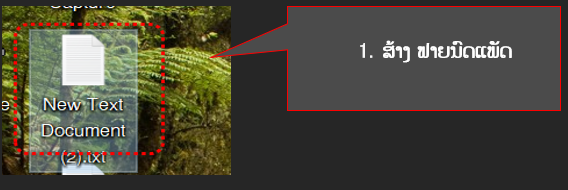
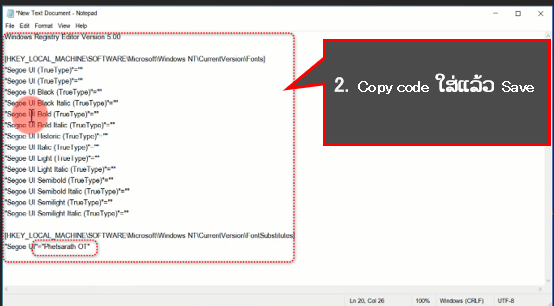
- Code ທີ່ໃຊ້ປ່ຽນ
Windows Registry Editor Version 5.00
[HKEY_LOCAL_MACHINE\SOFTWARE\Microsoft\Windows NT\CurrentVersion\Fonts]
“Segoe UI (TrueType)”=””
“Segoe UI (TrueType)”=””
“Segoe UI Black (TrueType)”=””
“Segoe UI Black Italic (TrueType)”=””
“Segoe UI Bold (TrueType)”=””
“Segoe UI Bold Italic (TrueType)”=””
“Segoe UI Historic (TrueType)”=””
“Segoe UI Italic (TrueType)”=””
“Segoe UI Light (TrueType)”=””
“Segoe UI Light Italic (TrueType)”=””
“Segoe UI Semibold (TrueType)”=””
“Segoe UI Semibold Italic (TrueType)”=””
“Segoe UI Semilight (TrueType)”=””
“Segoe UI Semilight Italic (TrueType)”=””
[HKEY_LOCAL_MACHINE\SOFTWARE\Microsoft\Windows NT\CurrentVersion\FontSubstitutes] “Segoe UI”=”Phetsarath OT
ວິທີ Save
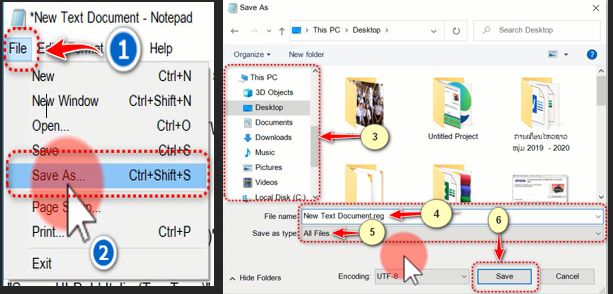
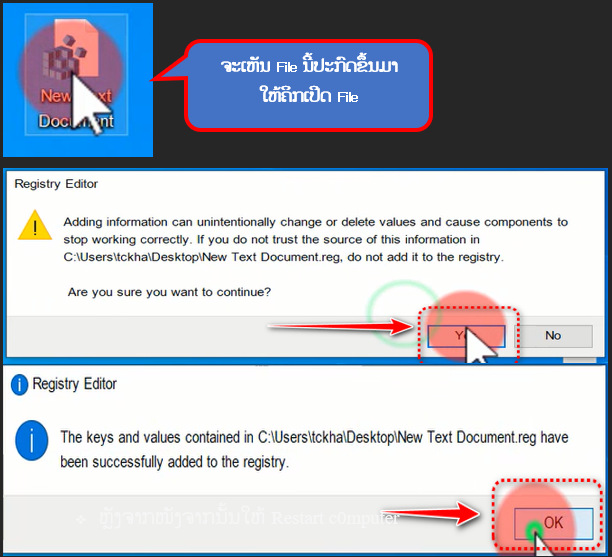
ຂຽງໂດຍ: ອຈ ເພັດສະດາ ທະວີສັກ
ສູນໄອຊີທີ ແພກແນກສຶກສາທິການ ແລະ ກິລາ ແຂວງບໍລິຄຳໄຊ